C# log4net 日志写入到数据库
效果图:
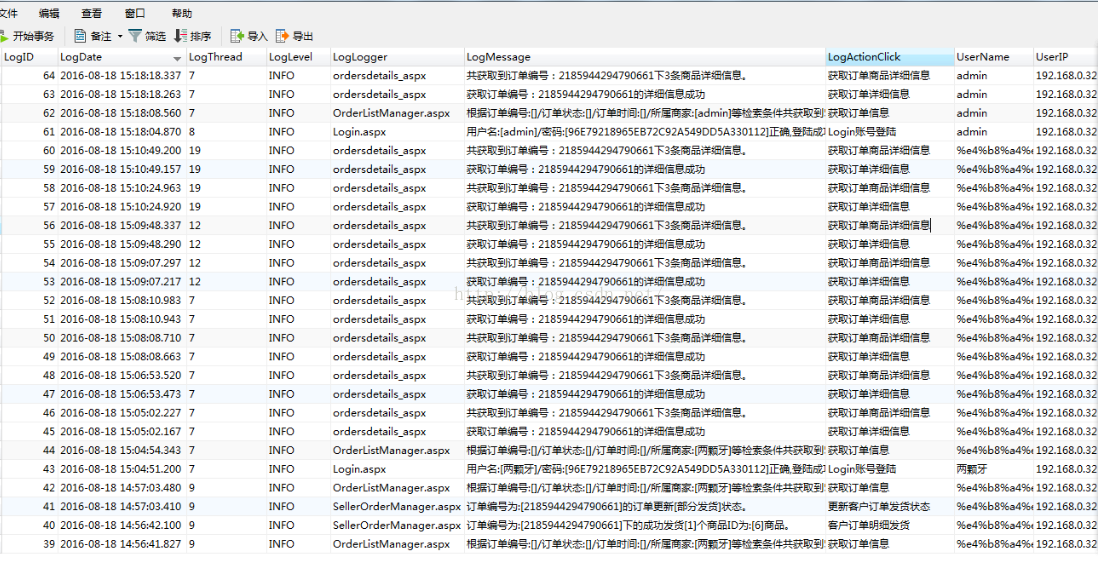
-
CREATE TABLE [dbo].[LogDetails] (

[LogID] int NOT NULL IDENTITY(1,1) ,

[LogDate] datetime NOT NULL ,

[LogThread] nvarchar(100) NOT NULL ,

[LogLevel] nvarchar(200) NOT NULL ,

[LogLogger] nvarchar(500) NOT NULL ,

[LogMessage] nvarchar(3000) NOT NULL ,

[LogActionClick] nvarchar(4000) NULL ,

[UserName] nvarchar(30) NULL ,

[UserIP] varchar(20) NULL

)
2:创建项目然后下载log4net.dll 在项目中添加引用 http://logging.apache.org/log4net/download_log4net.cgi下载Binaries 下面的
3:创建 log4net.config
-
<?xml version="1.0" encoding="utf-8" ?>
4:在Web.config 里面加 configSections 节点 (CS可直接写在app.config里面,或者都写在一个config里面)
5:Properties 属性下面的AssemblyInfo.cs 追加 必须有这个,否则写入不到数据库中
-
//[assembly: log4net.Config.XmlConfigurator(Watch = true)]

//注意: ConfigFile 可以指定相对路径 和 绝对路径。 eg: /log/xxxx.log 或者 d://log//xxxx.log

[assembly: log4net.Config.XmlConfigurator(ConfigFile = "log4net.config", ConfigFileExtension = "config", Watch = true)]
6:添加 Global.asax
然后在Application_Start 追加 读取配置程序文件
-
protected void Application_Start(object sender, EventArgs e) { //应用程序启动时,自动加载配置log4Net XmlConfigurator.Configure(); } 7:创建自定义类 LogPublicClass.cs,为了方便写入数据库中 自定义的一些信息 using log4net.Layout; using log4net.Layout.Pattern; using System; using System.Collections.Generic; using System.Linq; using System.Reflection; using System.Web; namespace Log4NetApply { ////// 包含了所有的自定字段属性 /// public class LogContent { public LogContent(string macAddress, string computerName, string actionsclick, string description) { UserIP = macAddress; UserName = computerName; ActionsClick = actionsclick; Message = description; } ////// 访问IP /// public string UserIP { get; set; } ////// 系统登陆用户 /// public string UserName { get; set; } ////// 动作事件 /// public string ActionsClick { get; set; } ////// 日志描述信息 /// public string Message { get; set; } } public class MyLayout : PatternLayout { public MyLayout() { this.AddConverter("property", typeof(LogInfoPatternConverter)); } } public class LogInfoPatternConverter : PatternLayoutConverter { protected override void Convert(System.IO.TextWriter writer, log4net.Core.LoggingEvent loggingEvent) { if (Option != null) { // Write the value for the specified key WriteObject(writer, loggingEvent.Repository, LookupProperty(Option, loggingEvent)); } else { // Write all the key value pairs WriteDictionary(writer, loggingEvent.Repository, loggingEvent.GetProperties()); } } ////// 通过反射获取传入的日志对象的某个属性的值 /// /// ///private object LookupProperty(string property, log4net.Core.LoggingEvent loggingEvent) { object propertyValue = string.Empty; PropertyInfo propertyInfo = loggingEvent.MessageObject.GetType().GetProperty(property); if (propertyInfo != null) propertyValue = propertyInfo.GetValue(loggingEvent.MessageObject, null); return propertyValue; } } }
8:示例使用
-
try

{

log.Info(new LogContent("127.0.0.1", "111111", "登陆系统", "登陆成功"));

var ss = 1 - int.Parse("sss");

}

catch(Exception ex)

{

log.Error(new LogContent("127.0.0.1", "111111", "登陆系统", ex.Message+":"+ex.StackTrace));

}
其他自行参考下列文章
-
http://www.cnblogs.com/kissazi2/p/3393151.html

http://blog.csdn.net/zdw_wym/article/details/48802821

http://blog.csdn.net/ydm19891101/article/details/50561638


http://www.cnblogs.com/yuangang/archive/2016/05/16/5497140.html