thinkphp网站应用微信扫码登录
- 登录 微信开放平台
1.简要引导
-
根据在下的需求,选择了“网站应用开发” 的创建,然后按照官方提示进行材料的申请,一般需要三天以上

-
可以注意到,
网站应用开发的简要功能介绍
-
当应用创建通过后,必须还要满足接口权限的获取,会有工作人员主动联系,一般一天就能完成
2.绑定公众账号/小程序
为了保证同一个开发账号下对应微信用户的 UnionID 绑定使用,需要在下面的列表中绑定对应的公众号/服务号,文档中介绍一般要满足微信支付功能
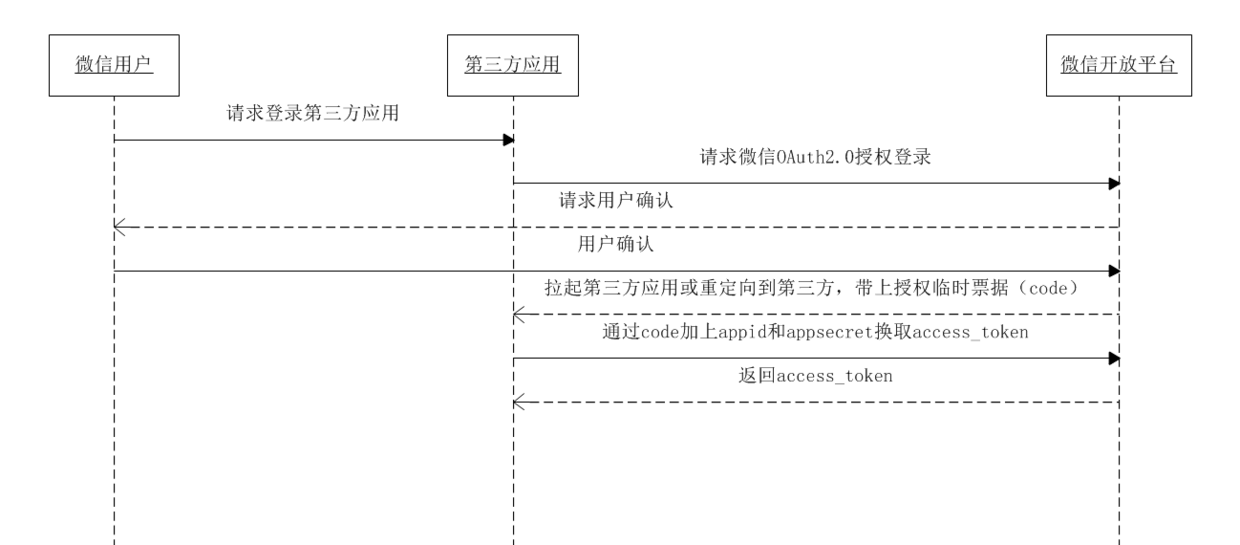
3.授权获取 access_token 时序图
三、代码实现
- 其实,主要的时间都花费在了前期的申请操作上,而真正的代码实现却是极为简单,以下是我的实现方式,敬请指摘
1、公共文件配置
- 习惯主要的配置信息同意放在了配置文件中,‘\Application\Common\Conf\config.php'。
| 1 2 3 4 5 6 |
'WEIXIN_LOGIN' => array(
// 微信开放平台 使用微信帐号登录App或者网站 配置信息
'OPEN_APPID' => 'wxbd961b2a6b7b2963', //应用 AppID
'OPEN_APPSECRET' => 'e6xxxxxxxxxxxxxxxxxxxxe90',//应用 AppSecret
'OPEN_CALLBACKURL' => 'http://www.52zhenmi.com/Home/Login/wxBack', //微信用户使用微信扫描二维码并且确认登录后,PC端跳转路径
),
|
2.核心代码
- 具体代码,请参考路径 “zmPro\Application\Home\Controller\LoginController.class.php”
| 1 2 3 4 5 6 7 8 9 10 11 12 13 14 15 16 17 18 19 20 21 22 23 24 25 26 27 28 29 30 31 32 33 34 35 |
public function wxIndex(){
//--微信登录-----生成唯一随机串防CSRF攻击
$state = md5(uniqid(rand(), TRUE));
$_SESSION["wx_state"] = $state; //存到SESSION
$callback = urlencode($this->callBackUrl);
'https://https://blog.csdn.net/u011415782/article/details/open.weixin.qq.com/connect/qrconnect?appid=APPID&redirect_uri=REDIRECT_URI&response_type=code&scope=SCOPE&state=STATE#wechat_redirect';
$wxurl = "https://https://blog.csdn.net/u011415782/article/details/open.weixin.qq.com/connect/qrconnect?appid="
.$this->appID."&redirect_uri="
.$callback."&response_type=code&scope=snsapi_login&state="
.$state."#wechat_redirect";
header("Location: $wxurl");
}
public function wxBack(){
if($_GET['state']!=$_SESSION["wx_state"]){
echo 'sorry,网络请求失败...';
exit("5001");
}
$url='https://api.weixin.qq.com/sns/oauth2/access_token?appid='.$this->appID.'&secret='.$this->appSecret.'&code='.$_GET['code'].'&grant_type=authorization_code';
$arr = curl_get_contents($url);
//得到 access_token 与 openid
$url='https://api.weixin.qq.com/sns/userinfo?access_token='.$arr['access_token'].'&openid='.$arr['openid'].'&lang=zh_CN';
$user_info = curl_get_contents($url);
$this->dealWithWxLogin($user_info);
}
/**
* 根据微信授权用户的信息 进行下一步的梳理
* @param $user_info
*/
public function dealWithWxLogin($user_info){
//TODO 数据处理
var_dump($user_info);
die;
}
|
3.前端显示
- 根据官方文档的介绍,既可以直接访问授权扫码界面,也可以进行自定义设计
- 估计本人脑抽,嵌套登录扫码的功能整了半天也没实现,在此只好使用默认跳转。

-
通过点击上图中的微信图标,直接跳转如下链接
https://https://blog.csdn.net/u011415782/article/details/open.weixin.qq.com/connect/qrconnect?appid=wxbd961b2a6b7b2963&redirect_uri=http%3A%2F%2Fwww.52zhenmi.com%2FHome%2FLogin%2FwxBack&response_type=code&scope=snsapi_login&state=204b244a5051207d1987a95f4a7e42c1#wechat_redirect -
显示效果如下:

- 扫描登录成功后进行页面跳转
